问题
If you want to write it to the DOM, pass a string instead…
当用 styled-components 去通过一些条件去修改第三方组件库的样式时像这样
const SortButton = styled(Button)`
  color: ${({ active }) => active ? 'red' : 'blue'}
`
这时候浏览器就会抛出一个 Warning
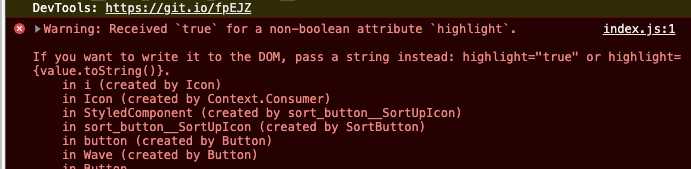
If you want to write it to the DOM, pass a string instead…
产生这个问题的原因,主要是因为使用的第三方组件库的组件默认会接受用户传给组件的所有 props, 这就导致用户自定义的字段不是非 Dom 原生支持的属性,导致出现上面的警告信息。
以 antd 的 Button 为例,它的内部实现实际是对原生组件 button 进行操作的,其中底层代码类似这样的
<button {...props} />我们给的非标准的 Dom 属性就会通过 props 给到原生 button, 就产生出了上面的问题。
如何解决
对于这种情况,styled-components 官方表态说:我们没办法帮用户处理这类问题的。具体讨论见:这里
那我们在使用的时候怎么来规避这个问题呢?有两种方式来处理:
- 将我们自定义的属性在传给第三方组件前给移除掉
- 采用 styled-compoments v5.1 版本提供的临时属性(Transient props)来处理
第一种方式示例:
- const SortButton = styled(Button)`
+ const SortButton = styled(({ active, ...otherProps }) => <Button {...otherProps} />)`
  color: ${({ active }) => active ? 'red' : 'blue'}
`
第二种方式示例
const Comp = styled.div`
  color: ${({ $active }) => $active ? 'red' : 'blue'};
`;

render(
  <SortButton $active={active} draggable="true">
   点击
  </SortButton>
);
总结
这类问题并非使用 styled-components 才会遇到,只要是给原生组件传了非标准属性都会抛这个错误,只是在用 styled-components 经常会对第三方组件进行包裹处理,所以遇到此类问题比较常见。
如果你也遇到同类问题,希望能帮助到你
参考:
https://github.com/styled-components/styled-components/issues/1198
【完】